August 28th Release Briefing
Summary
The August 2025 Authorium release introduces powerful new capabilities that simplify document processing, enhance evaluations, streamline legislative bill analysis, and improve user management through MS Entra integration. These updates focus on reducing manual work, improving automation, and creating a more seamless experience across the platform.
Collaborative Document Management (CDM)
- Convert Word Documents into Structured Content Automatically: Upload and convert Word files while preserving formatting and structure.
- Automatically Detect and Organize Document Structures with AI: Use AI to split documents, classify content, and build section hierarchies.
- Preview Document Suggestions Before Accepting or Rejecting: Review changes in context with new preview modes before committing edits.
- Reuse Digital Signatures Across Your Project: Insert signature variables captured in forms directly into project documents.
Evaluations
- Reference Smart Table Values in Deliverable Evaluation Scoring: Dynamically link evaluation criteria to smart table data for consistent scoring.
Contracts
- Connect Contract Data to Your Systems with Authorium’s Expanded API: Integrate Authorium with external tools to sync projects, contracts, and amendments programmatically.
Supplier Submissions
- Faster Bill Analysis with Smart Bill Info Lookup: Select bills, import their data automatically, and generate bill documents directly in your project.
- Keep Your Vendor Pools Open Indefinitely: Manage vendor submissions and evaluations on a rolling basis to maintain active pools without restarting projects.
User Management
- Automate User Profile Sync with Microsoft Entra Integration: Keep user data current with automated synchronization from Entra directories.
- Discover and Manage Directory Users with Seamless Microsoft Entra Integration: Enrich profiles and manage user states using live organizational data.
- Build User-Aware Forms with Live Directory Integration: Add user fields that pull live Entra data into forms and workflows.
- Assign Approvers and Stage Owners Using Project Variables: Dynamically assign roles using form-based variables and user directory data.
Platform Enhancements
- Work Faster with a More Intuitive Interface: Navigate documents with improved pagination, cleaner formatting, and faster load times.
- Start Projects Instantly from a Requestor Link: Automatically create projects from requestor links and skip unnecessary steps.
Release Features
Convert Word Documents into Structured Content Automatically
Automatically Detect and Organize Document Structures with AI
Preview Document Suggestions Before Accepting or Rejecting
Reuse Digital Signatures Across Your Project
Reference Smart Table Values in Deliverable Evaluation Scoring
Connect Contract Data to Your Systems with Authorium’s Expanded API
Faster Bill Analysis with Smart Bill Info Lookup
Keep Your Vendor Pools Open Indefinitely
Automate User Profile Sync with Microsoft Entra Integration
Discover and Manage Directory Users with Seamless Microsoft Entra Integration
Build User-Aware Forms with Live Directory Integration
Assign Approvers and Stage Owners Using Project Variables
Work Faster with a More Intuitive Interface
Start Projects Instantly from a Requestor Link
Convert Word Documents into Structured Content Automatically
Summary:
Save time and avoid rework when bringing Word documents into Authorium. Upload your files, let the system validate them automatically, and get structured, editable content that preserves your original formatting—ready to use across your projects.
New Functionalities Added:
- Upload and validate Word files with automatic checks for format, size, and structure.
- Convert documents to clean HTML while keeping text formatting, tables, and images intact.
- Generate structured, ready-to-use content with metadata, section hierarchy, and clear organization.
- Monitor processing health easily with built-in service checks to ensure reliability.
- Get clear error messages if an upload fails, so you know exactly what needs to be fixed.
Automatically Detect and Organize Document Structures with AI
Summary:
Let AI handle the heavy lifting of organizing your documents. Automatically split large files, classify attachments and exhibits, and get clean section hierarchies—even when formatting is inconsistent—so you can focus on reviewing content instead of fixing structure.
New Functionalities Added:
- Detect document boundaries automatically to split large files into separate templates.
- Identify document categories such as Attachments, Exhibits, or Appendices based on titles and content.
- Analyze and organize section hierarchies intelligently, even with inconsistent formatting.
- Group related content logically for a clear and usable document structure.
- Generate organized output with AI insights so you can review and work with properly structured documents immediately.
- Handle ambiguous cases reliably with fallback detection and clear error handling.
Preview Document Suggestions Before Accepting or Rejecting
Summary:
Review your document with confidence before committing changes. Use the new preview modes to see how your document will look with all suggestions accepted, rejected, or in their original state—without making any edits.
New Functionalities Added:
- Preview changes in four modes: Original, Accepted, Rejected, and Accepted + Rejected.
- Read-only preview interface with clear visual indicators and a simple exit option.
- Quick access from the Track Changes toolbar with a dedicated preview dropdown.
- Instant switching between views so you can verify changes without leaving the editor.
Reuse Digital Signatures Across Your Project
Summary:
Stop re-uploading or recreating signatures. Now, when someone signs a form, their signature is automatically saved as a variable you can place directly into your documents or tables—ensuring signatures appear exactly where you need them without extra work.
New Functionalities Added:
- Automatic signature variable creation whenever a signature is completed in a form.
- Signature images stored as variables with clear naming conventions for easy identification.
- Insert signature variables directly into documents and tables without manual copying.
- Organized variable picker to quickly find and reuse the right signature.
- Real-time updates as new signatures are captured in forms.
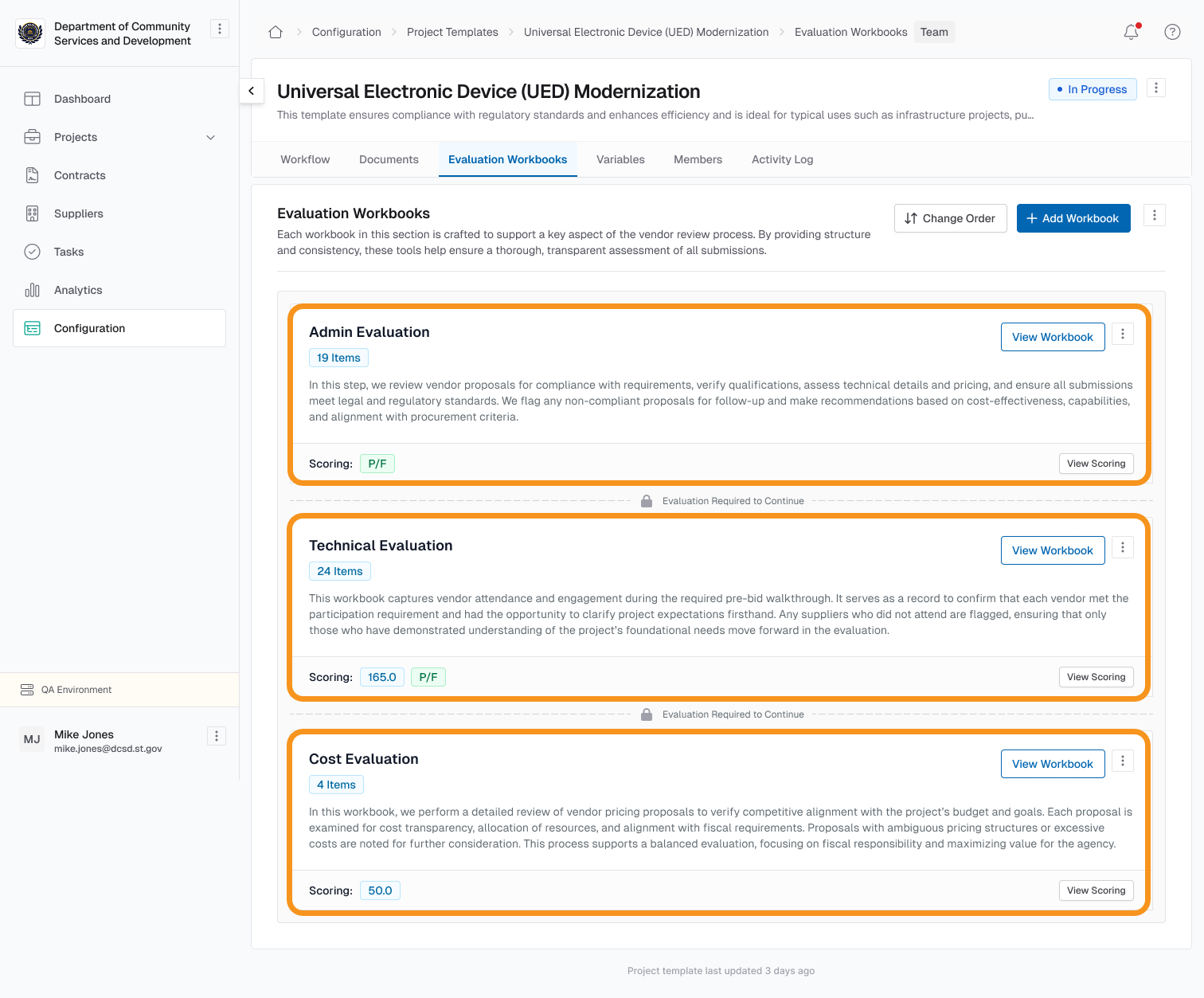
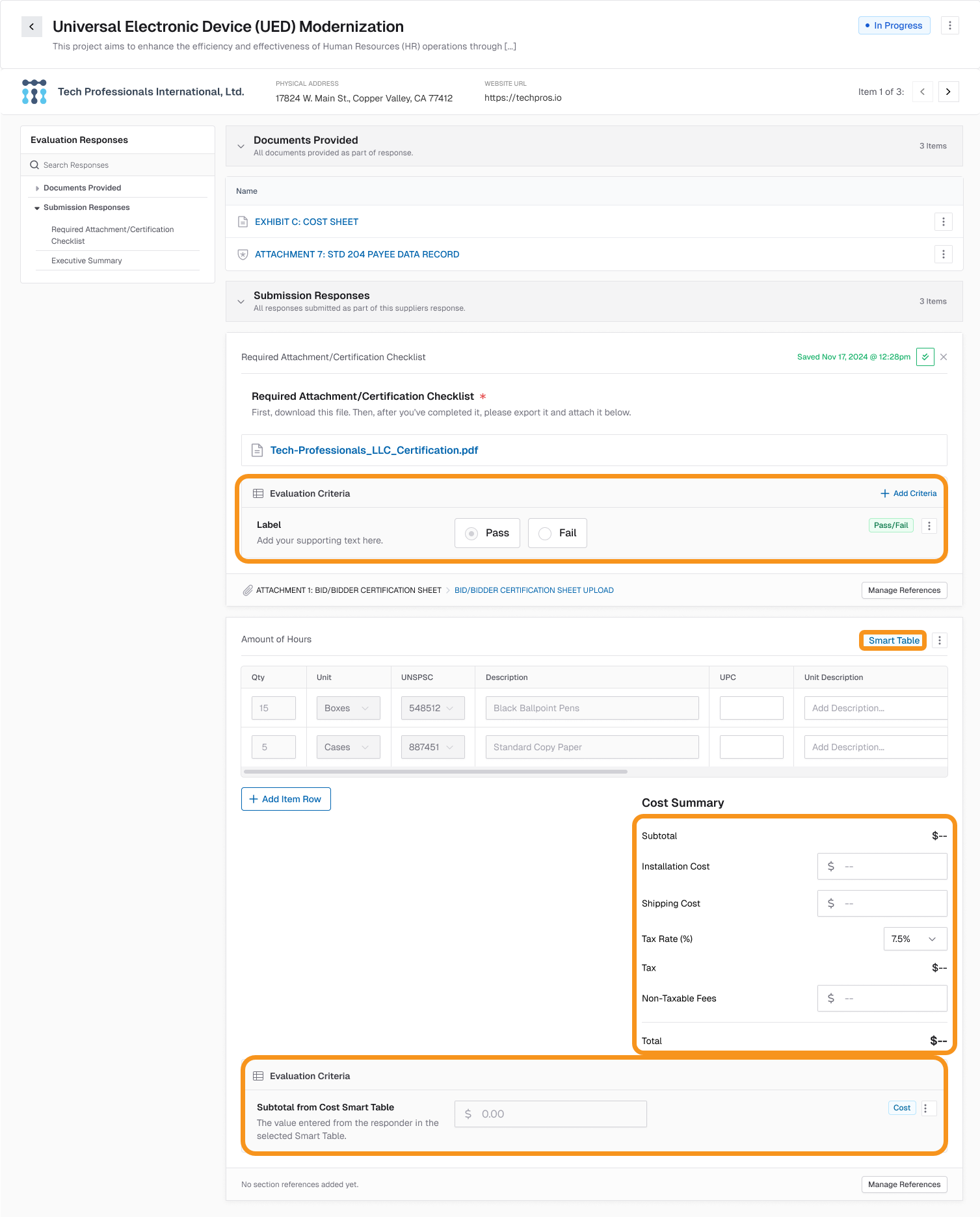
Reference Smart Table Values in Deliverable Evaluation Scoring
Summary:
Reduce manual entry and keep evaluations accurate by pulling data straight from your Deliverables smart tables. You can now reference single-row table values directly in Evaluation Criteria, ensuring that scoring stays consistent and error-free.
New Functionalities Added:
- Reference single-row smart table values directly in Deliverable Evaluation Criteria.
- Select eligible smart tables and columns from a dropdown for quick configuration.
- Lock Evaluation Criteria fields automatically when linked to a smart table to prevent accidental edits.
- See clear indicators showing which values come from smart tables.
- Use existing Deliverables data seamlessly, eliminating the need to re-enter information.
Faster Bill Analysis with Smart Bill Info Lookup
Summary:
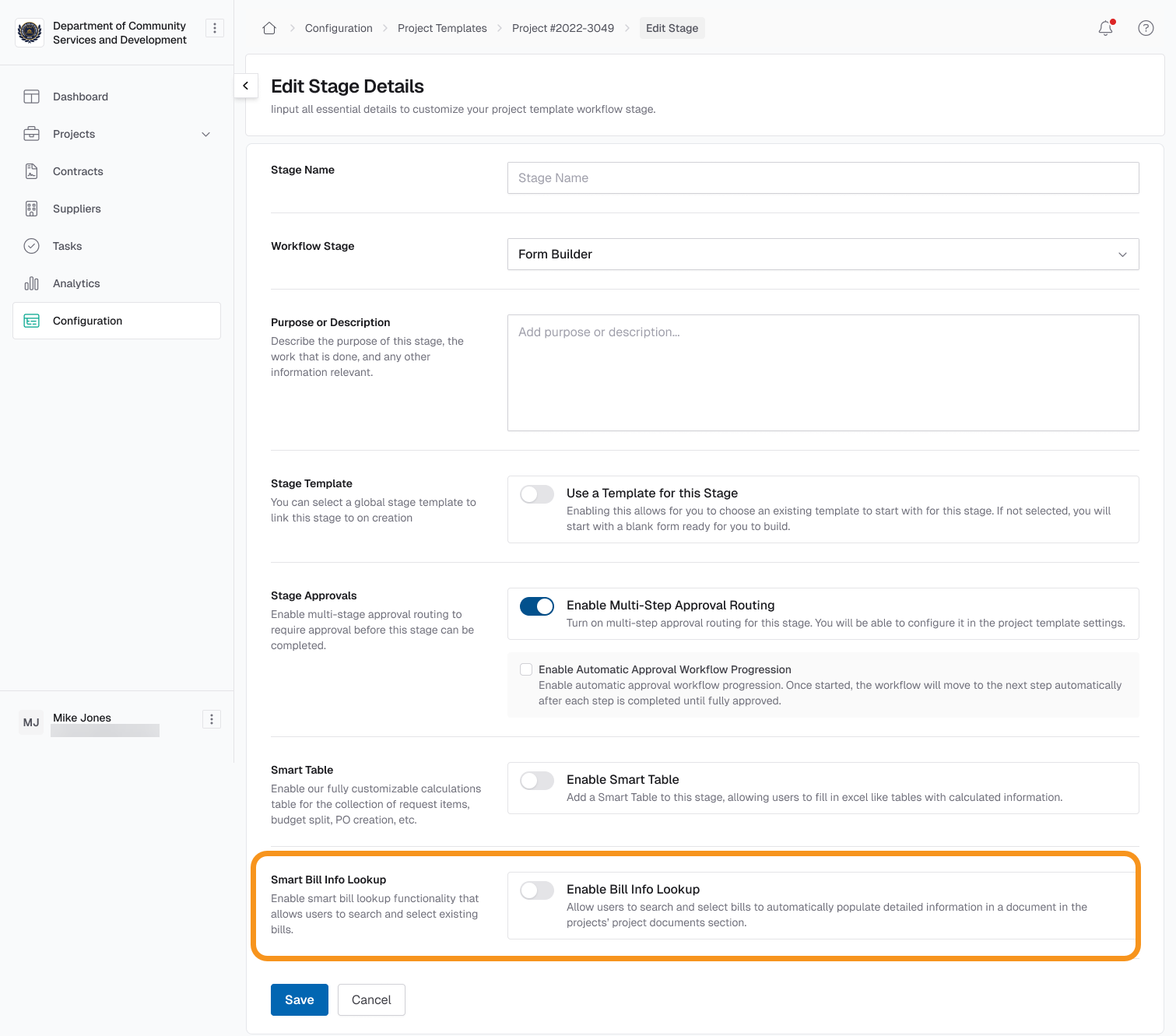
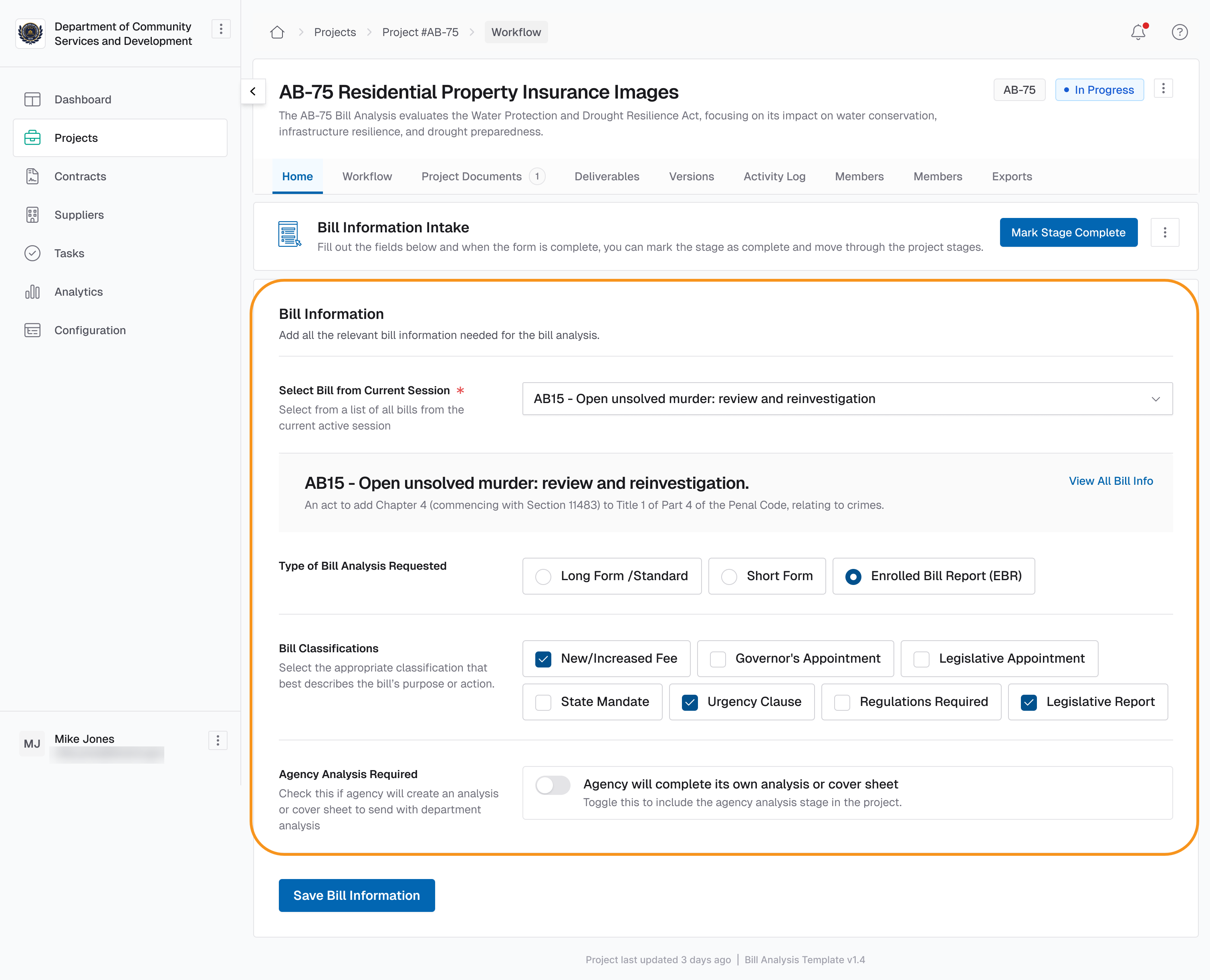
Start bill analysis projects faster with integrated bill selection and automatic data population. You can now search for a bill, preview its details, and add its information—along with a full read-only version of the bill—directly to your project, eliminating manual setup.
New Functionalities Added:
- Enable Smart Bill Info Lookup when setting up templates for bill analysis projects.
- Search and select bills quickly using a searchable dropdown with bill numbers and titles.
- Preview bill details including title, summary, and a direct link to LegiScan before finalizing your selection.
- Automatically add bill data to your project with variables for bill number, title, authors, sponsors, and voting records.
- Generate a read-only bill document within Project Documents for easy reference while you work.
- Control deployment with feature flags to enable this functionality at the organization level.
Keep Your Vendor Pools Open Indefinitely
Summary:
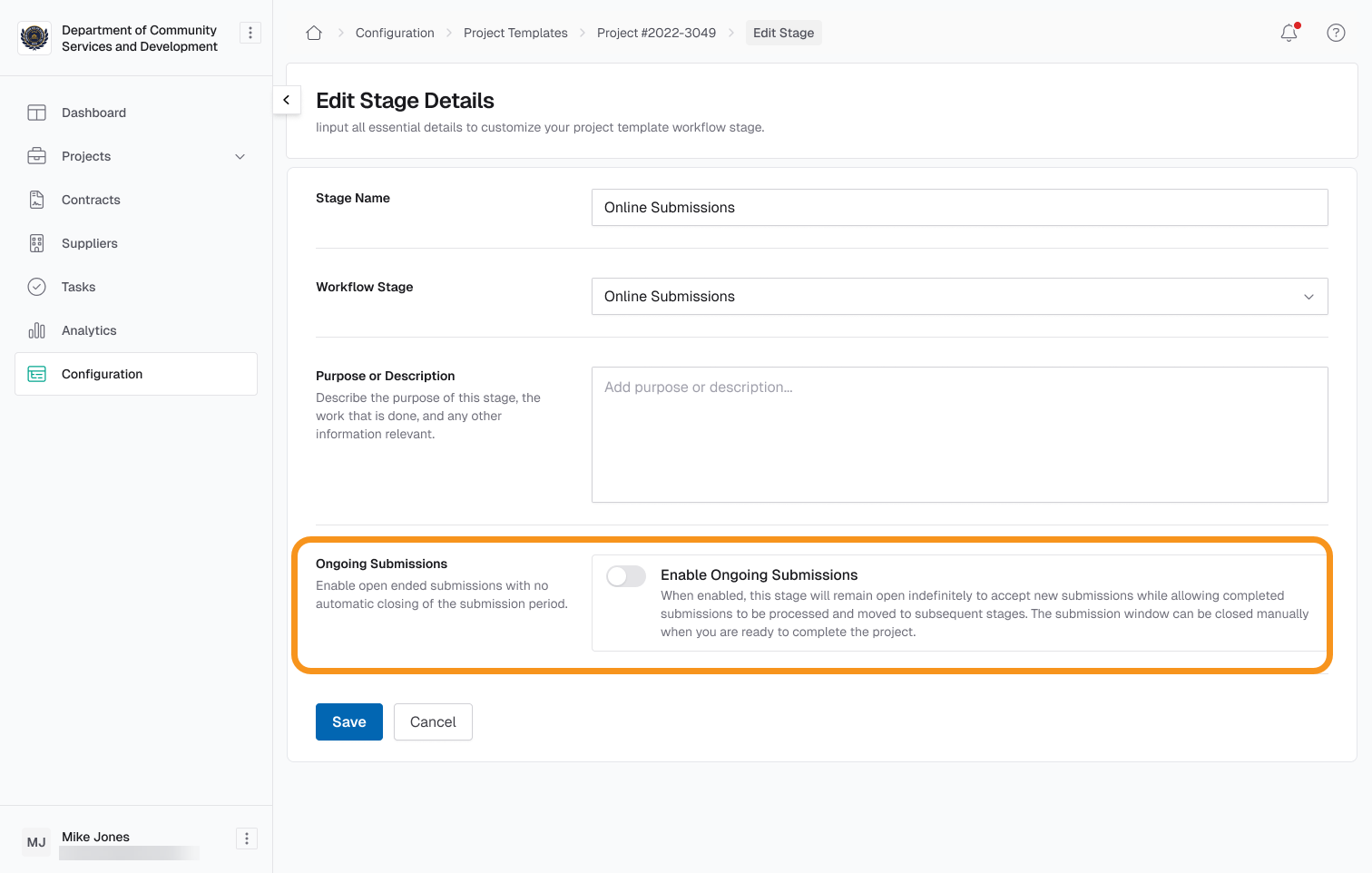
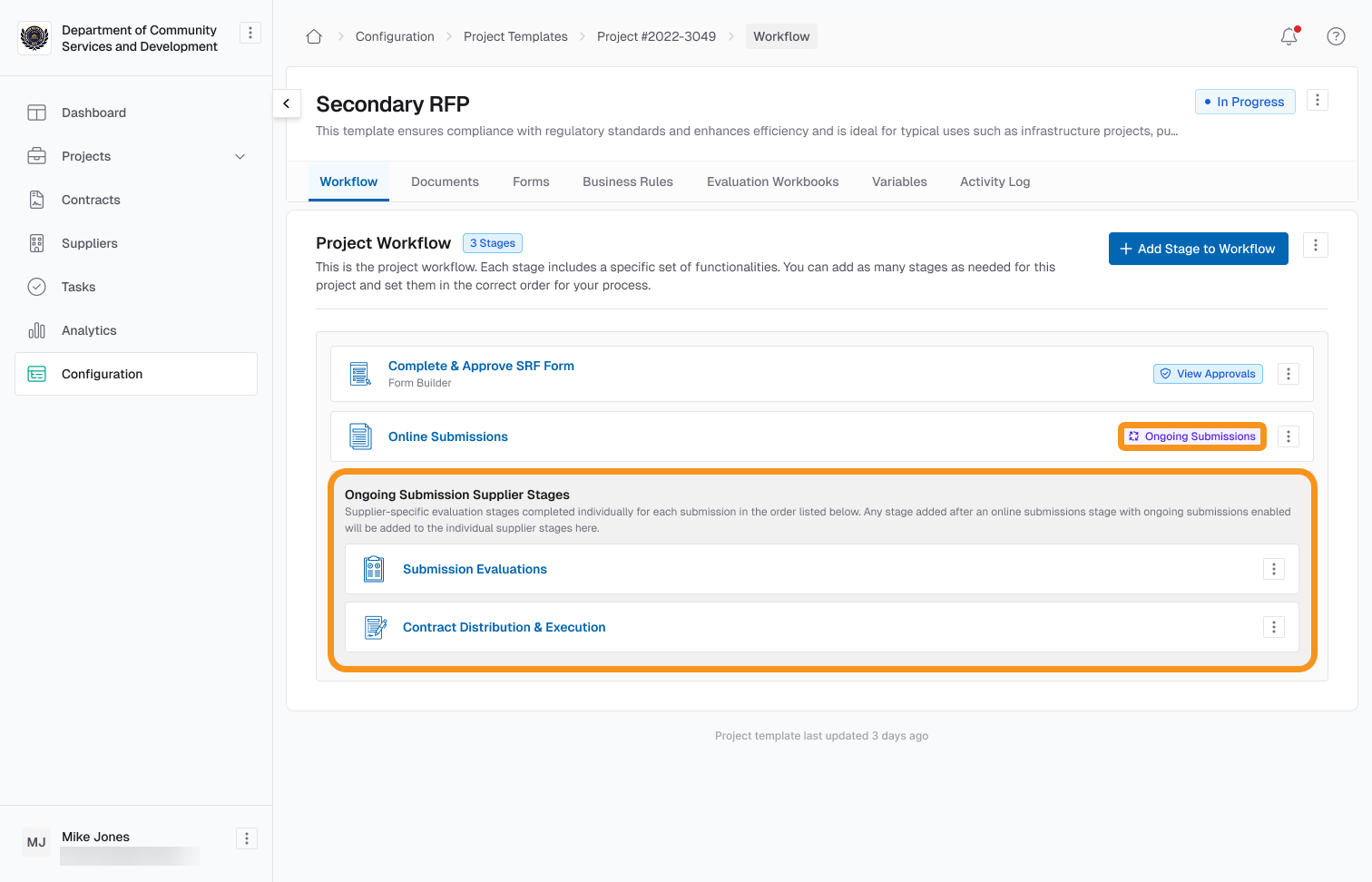
Build and maintain qualified vendor pools without the hassle of restarting projects. With Evergreen Pools—pools that stay open without an end date—you can keep submissions and evaluations running continuously, let vendors submit proposals anytime, and manage awarded vendors in one place.
New Functionalities Added:
- Create Evergreen Pools to allow continuous submissions and evaluations without an end date.
- Maintain a single, permanent submission link so vendors can join the pool anytime.
- Evaluate vendors on a rolling basis without closing or restarting stages.
- Assign awarded vendors to pool verticals and sub-verticals for clear organization and tracking.
- Automatically create contracts for awarded vendors to streamline vendor onboarding.
- View and manage vendor contracts in one centralized overview.
- Add awarded vendors directly to the pool to simplify tracking and ensure eligibility.
Automate User Profile Sync with Microsoft Entra Integration
Summary:
Stop managing user data manually. With the new Microsoft Entra User Profile Data Integration, your user directory stays automatically synchronized with Authorium. This ensures that approvals, routing, and provisioning always run on accurate, up-to-date information—without extra effort from your team.
New Functionalities Added:
- Automatically sync user profiles from Microsoft Entra ID into Authorium every day.
- Bring in custom attributes from your directory for more precise workflows.
- Track changes automatically—new hires, updates, and deactivations are reflected without manual updates.
- Map manager relationships to keep organizational hierarchies accurate for approvals.
- Rely on a robust sync process with error handling and monitoring to ensure data integrity.
- Support multiple organizations with isolated, tenant-specific configurations.
Discover and Manage Directory Users with Seamless Microsoft Entra Integration
Summary:
Authorium now connects with your Microsoft Entra directory to help you discover users, enrich profiles, and manage access based on live organizational data. Existing accounts are enhanced with directory details, while new users can be identified and invited without duplicating records. All of this works without changing your current login or onboarding experience.
New Functionalities Added:
- Discover uninvited users from your Microsoft Entra directory directly in Authorium.
- Enrich existing Authorium accounts with live Entra profile data including department, title, and manager.
- Preserve your local deactivation decisions even when users remain active in Entra.
- Track user lifecycle states (uninvited, invited, accepted, deactivated) for better visibility and control.
- Support for custom attributes lets you access additional Entra data tailored to your organization.
- Hybrid matching strategy ensures reliable user mapping using email and Entra ID.
- Search and select users more efficiently in forms, approvals, and workflows.
- Maintain full SSO compatibility with no change to existing login flows.
Build User-Aware Forms with Live Directory Integration
Summary:
Transform static input fields into dynamic, organization-aware selectors with the new “User” component in the Form Builder. This enhancement connects directly to your live Microsoft Entra directory, allowing you to select users in real time, auto-fill related fields, and power approval workflows without needing custom code or API configuration.
New Functionalities Added:
- Insert a new “User” component into any form to enable live user selection during form completion.
- Filter user options automatically so only members of the current organization appear.
- Auto-fill key fields such as email, department, and title based on the selected user’s profile.
- Generate workflow variables of type “User” to support dynamic approver and stage owner assignments.
- Handle large directories efficiently with typeahead search and lazy loading performance.
- Export forms cleanly across development, staging, and production environments without reconfiguration.
- Maintain security and portability without requiring additional authentication tokens or JavaScript.
Assign Approvers and Stage Owners Using Project Variables
Summary:
Configure workflow steps dynamically by assigning both approvers and stage owners using project variables. This enhancement makes it easier to build reusable workflows that respond to form data, reduces manual setup, and ensures consistent behavior across approvals and stage ownership.
New Functionalities Added:
- Unified assignment menu to add specific users, placeholders, email groups, or project variables.
- Support for user/email variables in both approval steps and stage ownership settings.
- Filtered variable selector that only shows variables resolving to users or email addresses.
- Visual distinction for variable tokens using icons and tooltips to differentiate from static users.
- Shared assignment logic across approvals and stages for consistent runtime behavior.
- Error handling at runtime for unresolved values, inactive users, or invalid addresses.
- Multi-tenant support with tenant-specific filtering and scoped variable access.
- Integration with user selection components and live directory data for seamless resolution.
Connect Contract Data to Your Systems with Authorium’s Expanded API
Summary:
Authorium’s API now supports deeper integration with your existing systems by exposing endpoints for project documents, contracts, and amendments. These enhancements simplify reporting, reduce manual data entry, and improve how contract information flows across your tools.
New Functionalities Added:
- Retrieve documents by project to keep external reports and records aligned with Authorium.
- Manage contract headers via API including create, retrieve, list, and update operations.
- Fetch contract documents programmatically to maintain an up-to-date contract repository.
- Create and manage amendments through the API to ensure contract updates are consistently tracked.
Work Faster with a More Intuitive Interface
Summary:
Get more done with smoother navigation, cleaner document exports, and consistent behavior across forms, evaluations, and project workflows. This release focuses on removing friction and improving the overall experience, helping you work more efficiently across every stage of Authorium.
New Functionalities Added:
- Export cleaner PDFs and Word documents with standardized fonts, spacing, and improved handling of headers, footers, and numbered lists.
- Manage Smart Tables more easily with clearer field labels, improved rendering in exports, and automatic calculation options.
- Automatically save drafts in form builder stages, preventing loss of work.
- Navigate the editor seamlessly with better pagination and responsive layouts that adapt to browser resizing.
- Export evaluation data in clearer, PRA-friendly formats to simplify reporting.
- Rely on standardized date and time formatting, automatically adjusted to your organization’s location.
- Use navigation enhancements like "Save last page" in project documents and Command/Ctrl-click to open items in new tabs.
- Confirm key actions with new modals, including “Submit and Continue” for smoother submission workflows.
- Work with better-designed supplier surveys for improved clarity and usability.
- Take advantage of improved performance in document editors, smart tables, and other core workflows for faster load times.
Start Projects Instantly from a Requestor Link
Summary:
Requestors no longer need to create projects or navigate menus to get started. When a user enters the platform using a pre-configured link, Authorium now creates the project automatically and opens the first stage—ready for input. This reduces friction, eliminates errors, and ensures each project starts with the right structure and ownership.
New Functionalities Added:
- Automatic project creation based on the entry link used by the requestor.
- Direct access to the first stage, skipping any intermediate setup steps.
- Stage ownership assigned automatically, giving the requestor full access to begin.
- Pre-filled project defaults, configured from the project type linked in the URL.
- Fewer manual steps improve accuracy and reduce time to submission.
Coming Soon
Document Processing and AI Enhancements
- AI-powered parsing: Automatically identify sections and structure.
- Conversational workflows: Confirm and refine document structure using interactive review.
- Optimized performance: Improve processing speed for large documents.
- Caching mechanisms: Enable faster imports through smart caching.
- Interactive review interface: Confirm and adjust AI-generated structures directly.
- Learning from user feedback: Continuously improve detection accuracy based on user input.
- Industry-specific training: Enhance document type recognition for specific industries.
- Advanced confidence scoring: Highlight AI suggestions that require review.
- Print preview with full context: Generate a printable version of your document showing accepted and rejected changes exactly as they appear in the editor.
- Shareable preview links: Send read-only links so collaborators can review changes without entering the editor.
Evaluations and Smart Tables
- Support for multi-row smart tables: Filter and map rows for more complex evaluation criteria.
- Row-specific logic: Apply filters or mapping rules to choose relevant data per evaluation.
- Custom variable naming: Provide clearer display names for referenced variables.
- Cross-stage referencing: Pull data from other project stages into Evaluation Criteria.
- Advanced validation and warnings: Notify users when referenced smart table data is deleted or modified.
Legislation and Bill Analysis
- Multiple bill selection: Analyze more than one bill in a single project.
- Bill filtering: Filter bills by type, status, or committee.
- Historical bill access: Retrieve bills from previous legislative sessions.
- Preview mode for Form Builder templates: Review bill selection before publishing forms.
- Support for multiple legislative sessions: Manage bills from different sessions with custom data selection.
- Background job to sync current session bills: Keep a local copy of all current bills for faster access.
- Enable legislative forms in child organizations: Share bill-related forms with departments under the main org.
Digital Signatures
- Signature image resizing and formatting options: Adjust signature size and appearance.
- Typed or uploaded signatures: Convert non-drawn signatures into variables.
- Bulk management tools: Manage multiple signature variables efficiently.
- Advanced positioning and alignment controls: Place signatures precisely in documents.
- Integration with signature verification systems: Validate signatures against trusted providers.
User Management and Entra Integration
- Real-time synchronization: Sync user data instantly from Microsoft Entra.
- Automated role assignment: Assign roles automatically based on Entra groups.
- Organizational hierarchy visualization: Display advanced user hierarchy views.
- User profile photo integration: Import and display user profile images from Entra.
- Advanced user filtering: Filter users by department, role, or custom attributes.
- Caching mechanisms: Improve performance for large user directories.
- Graceful offline handling: Ensure forms and workflows work even if user data is temporarily unavailable.
- Rehire support: Handle returning users gracefully with updated state tracking.
- Organization-specific integration settings: Manage unique Entra configurations per organization.
Workflow and Variable Assignments
- Advanced fallback rules: Assign to a manager or department head if the primary assignee is unavailable.
- Variable resolution for parent-child workflows: Dynamically resolve variables across organizational structures.
- Detailed logging and notifications: Provide visibility for unresolved assignments and errors.
- Workflow failure alerts: Notify project and stage owners of assignment issues that may block execution.