September 30th Release Briefing
Summary
The September 2025 Authorium release introduces major improvements across tasks, document management, submissions, and contracts. These updates simplify collaboration, improve consistency in formatting and numbering, and give agencies and suppliers more flexibility during active processes. The focus this month is on keeping projects moving smoothly while ensuring compliance, accountability, and ease of use.
Collaborative Document Management (CDM)
- Better Paragraph Spacing Control: keep documents clean and consistent across paragraphs, lists, and pasted content.
- Enforce Global Track Changes in Collaborative Documents: guarantee accountability by requiring tracked edits across all collaborative work.
- Custom Section Numbering for Templates: configure numbering formats at the template level to meet legal, regulatory, or organizational standards.
Tasks
- Track and Manage All Your Tasks in One Place: create, organize, and monitor tasks globally across projects, stages, and CDM sections, with flexible views and notifications.
Contracts
- Upload Documents to Contract Repository: keep contract records complete by uploading, editing, and organizing files directly in the repository, fully compatible with e-signatures.
Supplier Submissions
- Create and Publish Addenda Without Interrupting Online Submissions: draft and release addenda while suppliers continue working, with automatic notifications once published.
- Edit Deliverables and Evaluation Workbooks During Online Submissions: update deliverables and evaluation criteria in draft addenda versions, while preserving supplier responses and minimizing rework.
Platform Enhancements
- Work Faster with a More Intuitive Interface: navigate projects, documents, and submissions with improved layouts, cleaner exports, and better performance across the platform.
Release Features
Track and Manage All Your Tasks in One Place
Better Paragraph Spacing Control
Work Faster with a More Intuitive Interface
Create and Publish Addenda Without Interrupting Online Submissions
Enforce Global Track Changes in Collaborative Documents
Upload Documents to Contract Repository
Custom Section Numbering for Templates
Edit Deliverables and Evaluation Workbooks During Online Submissions
Track and Manage All Your Tasks in One Place
Summary:
Staying on top of projects just got easier. With the new Tasks feature, you can create and track action items across all your work in one central place. Whether you’re jotting down a quick to-do or converting ideas directly from Collaborative Document Management (CDM) sections, tasks keep your team organized and accountable. You can view tasks in an interactive card view by default, switch to a clear list view for detailed tracking, and rely on email notifications to stay up to date.
New Functionalities Added:
- Create generic tasks to capture action items quickly, independent of a specific project.
- Work directly from Collaborative Document Management (CDM) documents by converting ideas into actionable tasks from section menus.
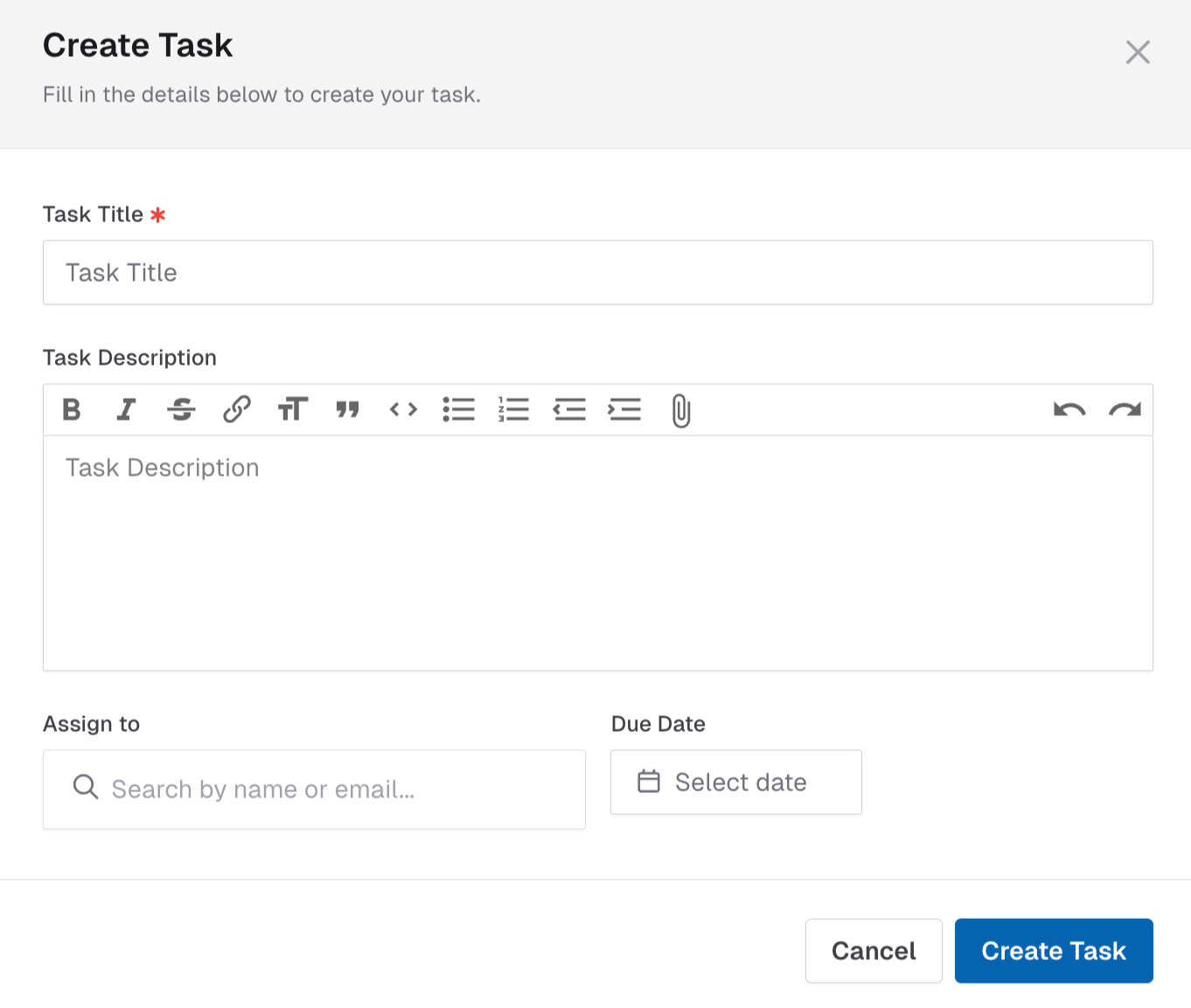
- View all your work in one place with access to every task assigned to you or created by you in the global Tasks tab.
- Organize with flexible views by using the default card view or switching to list view to track details like title, due date, assignee, and status.
- Sort tasks by project filter your global task list to focus on the projects that matter most.

- Stay in sync with notifications through email alerts when a task is assigned to you or when its status changes.
- Collaborate openly in a fully permissive environment where anyone can create, edit, and manage tasks, while the Activity Log ensures accountability.
Better Paragraph Spacing Control
Summary:
Keeping your documents clean and easy to read is now simpler. With better control over paragraph spacing, Authorium ensures consistent line spacing across paragraphs, lists, and pasted content. Whether you’re writing directly in the editor, copying from Word, or exporting your work, your documents will look polished and predictable every time.
New Functionalities Added:
- Maintain consistent line spacing across paragraphs and lists without extra manual formatting.
- Adjust paragraph spacing directly from the editor toolbar to improve readability without needing manual HTML or CSS edits.
- Ensure clean imports from Word so copied text doesn’t create excessive or uneven spacing.
- Get predictable results when exporting with line spacing preserved in the final output.
Work Faster with a More Intuitive Interface
Summary:
Work faster across projects, documents, and submissions with smoother navigation, cleaner exports, and improved performance. Updates in this release make tasks more intuitive, protect confidentiality during evaluations, and keep formatting consistent across Word and PDF exports—helping you stay focused on your work instead of fixing details.
New Functionalities Added:
- Navigate projects with less effort thanks to clearer layouts that make archived projects easier to organize.
- Export documents with confidence as header and footer images are preserved and numbered lists or table formats stay intact.
- Review contracts more efficiently since approvers can now make minor edits (like typos or formatting fixes) during approvals, with every change tracked in the approval history.
- Protect confidentiality in submissions by automatically anonymizing supplier questions during evaluations.
- Reach invitations and approvals in one step with new deep links that take you directly to what you need.
- Use corrected project template options where all fields now display properly when linking templates. We've improved how the list in the "Select Template for Template Type" field is displayed when changing a linked project template. The list is now visible and fully accessible, allowing you to select the correct template without any obstruction.
- Work with Smart Tables more smoothly using clearer field labels, improved exports, and better column handling.
- Paste from Word without losing formatting now that regressions have been fixed.
- View documents without distractions since unnecessary scrollbars have been removed in different screen sizes and imports.
- Keep plain text clean so it no longer turns into unwanted hyperlinks during Word imports.
- Handle large documents faster with optimizations that reduce timeouts and improve summarization reliability. We’ve made significant performance improvements to the editor when working with very large documents. Opening large files is now faster, and adding new sections at deeper levels is smooth and responsive without the freezing or unresponsive errors some users previously experienced.
Create and Publish Addenda Without Interrupting Online Submissions
Summary:
Managing changes during active solicitations is now easier. With Addenda, you can create and publish updates directly within the Online Submissions stage, without unpublishing the project. Suppliers can continue preparing their submissions while addenda are being drafted, and once published, they’re notified and required to update their submissions. This ensures transparency, minimizes disruptions, and keeps the process moving smoothly for both agencies and suppliers.
New Functionalities Added:
- Create addenda without unpublishing Online Submissions, so suppliers can keep working without interruptions.
- Ensure suppliers always see the right version by keeping in-progress edits hidden until addenda are officially published.
- Notify suppliers automatically when addenda are published, with direct links that take them to the updated submission.
- Require supplier updates so all submissions reflect the latest changes introduced by an addenda.
- Improve workflows and clarity with clearer document labeling, streamlined creation screens, and easier completion of addenda steps.
Enforce Global Track Changes in Collaborative Documents
Summary:
Ensure accountability and transparency across all collaborative documents. With global Track Changes enforcement, Project Owners, Org Admins, and Org Owners can ensure that edits are always tracked whether in templates or in active projects. This makes reviews more reliable, protects transparency, and gives teams full confidence that no changes slip through unnoticed.
New Functionalities Added:
- Enable Track Changes by default in templates so new projects automatically start with edits being tracked.
- Turn on global enforcement for active projects without template defaults to ensure edits are consistently captured.
- Apply tracking across all collaborative documents in current and future stages once enabled.
- Restrict who can disable Track Changes to Project Owners, Org Admins, and Org Owners for greater control.
- See clear warnings before turning off Track Changes so accountability is preserved.
Upload Documents to Contract Repository
Summary:
Keep your contract records complete and organized with the ability to upload documents directly into the contract repository. You can add files to either the official contract package or the supplier-provided section, making it easier to manage all related materials in one place. Once uploaded, documents are immediately available for viewing, can be retitled, and are fully compatible with e-signature workflows through DocuSign and AdobeSign.
New Functionalities Added:
- Upload one or multiple documents directly into a contract record for faster, more efficient management.
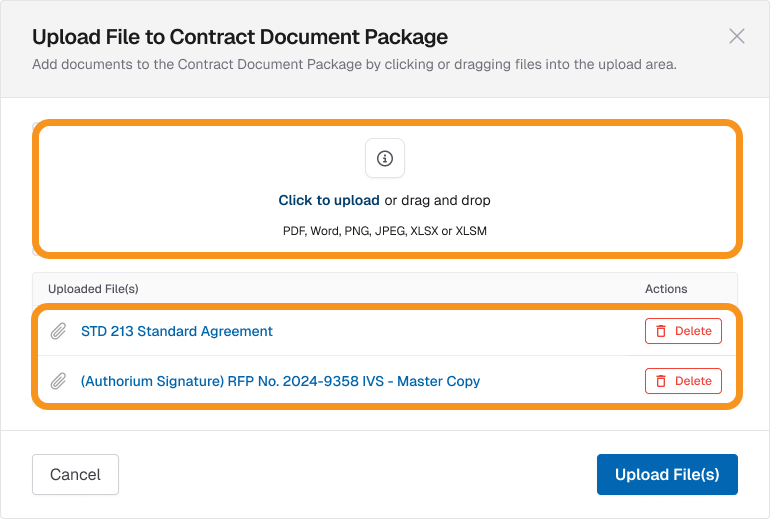
- Choose where documents go by adding them to the contract package or supplier-provided section.
- Edit titles, download, or delete documents to keep contract files accurate and up to date.
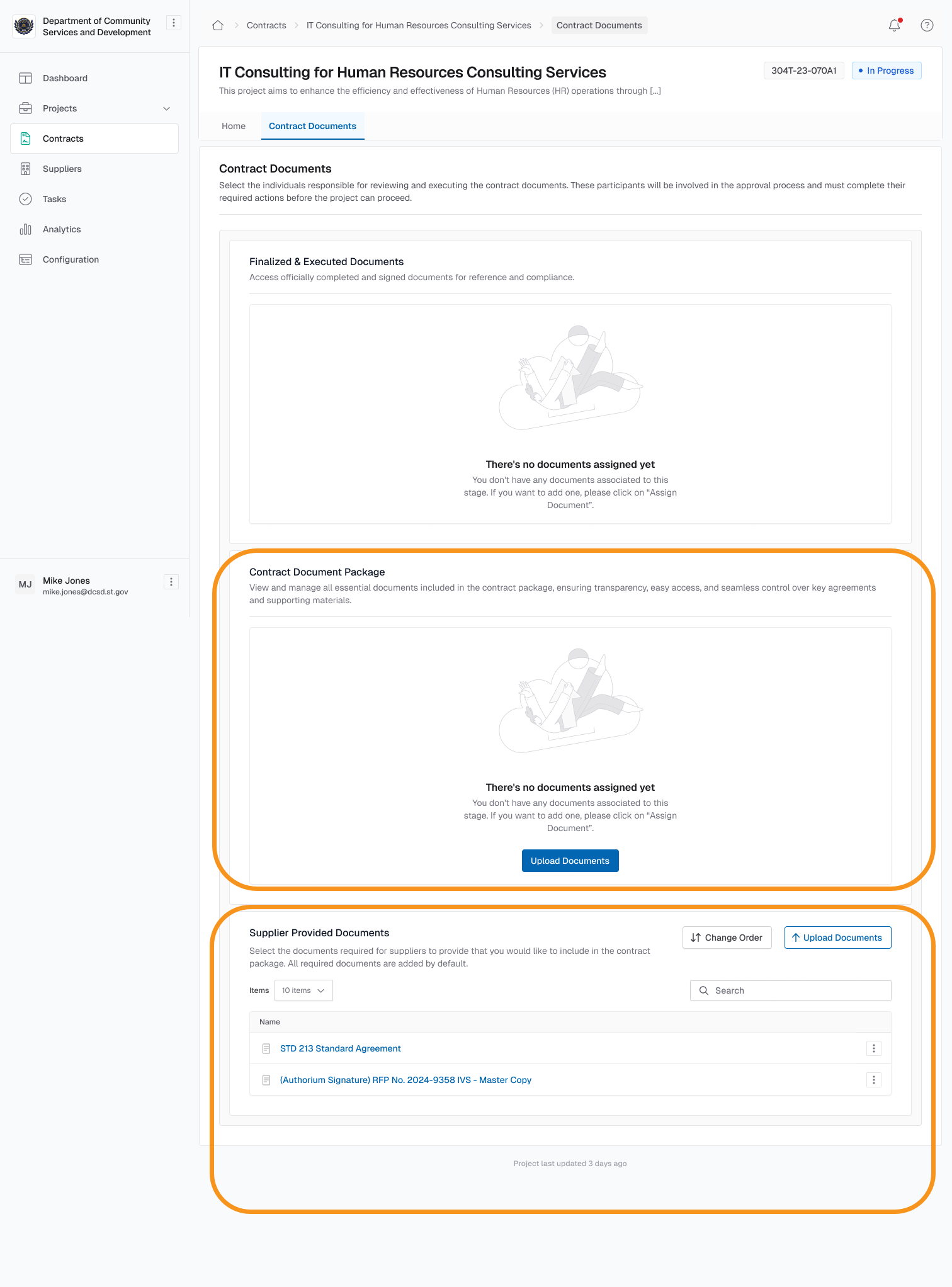
- Work with standard file types including PDF, Word, Excel, images, and CSV.
- View uploaded documents instantly without waiting for processing.
- Carry documents forward into amendments so the contract package always reflects the latest version.
- Include uploaded documents in e-signature workflows with DocuSign and AdobeSign.
Custom Section Numbering for Templates
Summary:
Administrators can now define custom section numbering formats at the template level, making it easy to align documents with legal, regulatory, or organizational standards. Whether your organization requires roman numerals, letter-based outlines, or combinations like 1.A.(1), this feature gives you the flexibility to configure numbering styles without custom development. Numbering automatically stays consistent across web display, exports, and large documents in Collaborative Document Management (CDM), ensuring clarity and compliance.
New Functionalities Added:
- Enable custom section numbering at the template level to standardize formatting across your organization.
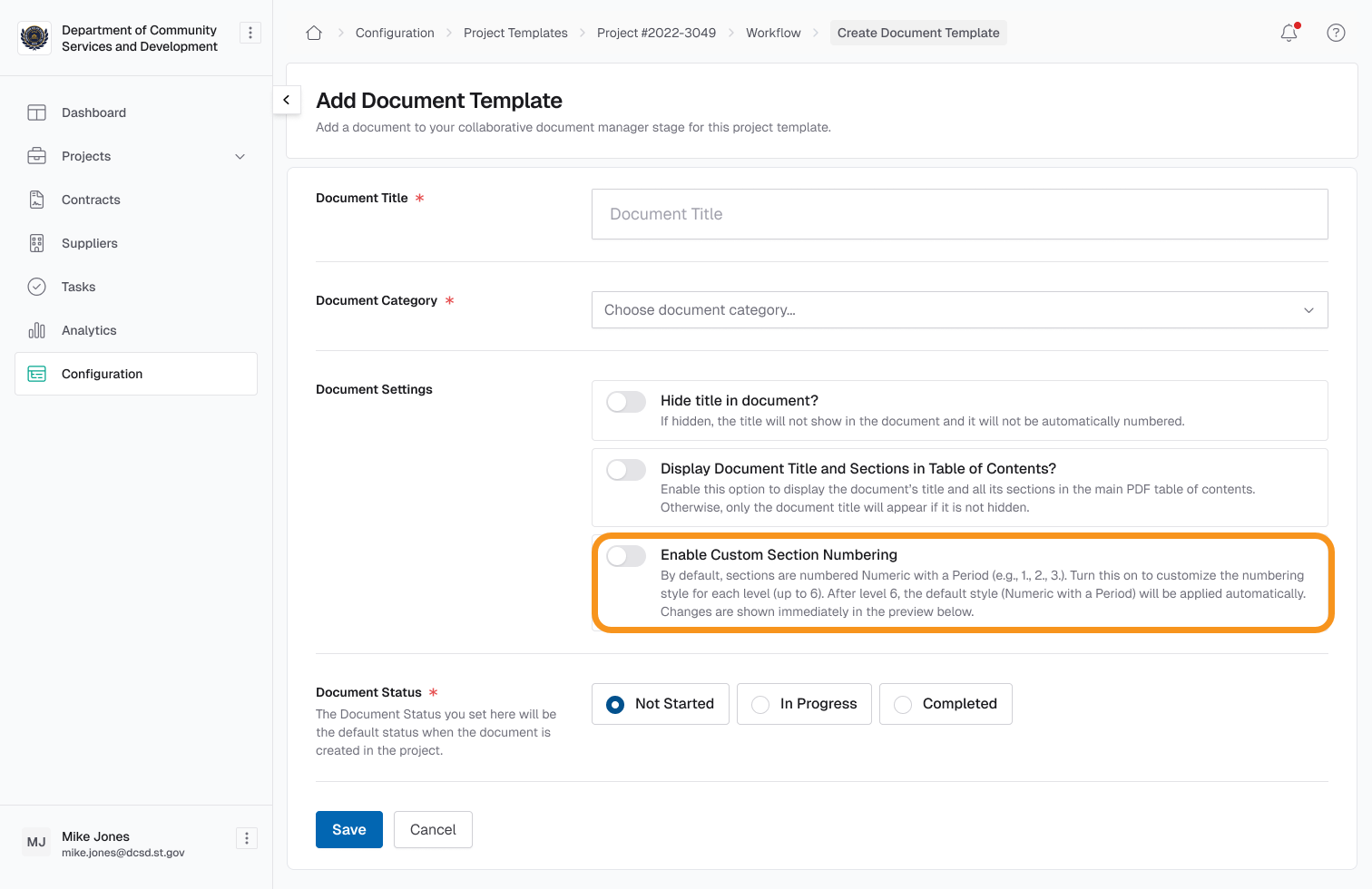
- Configure up to six nesting levels with flexible styles, including numbers, letters, and roman numerals.
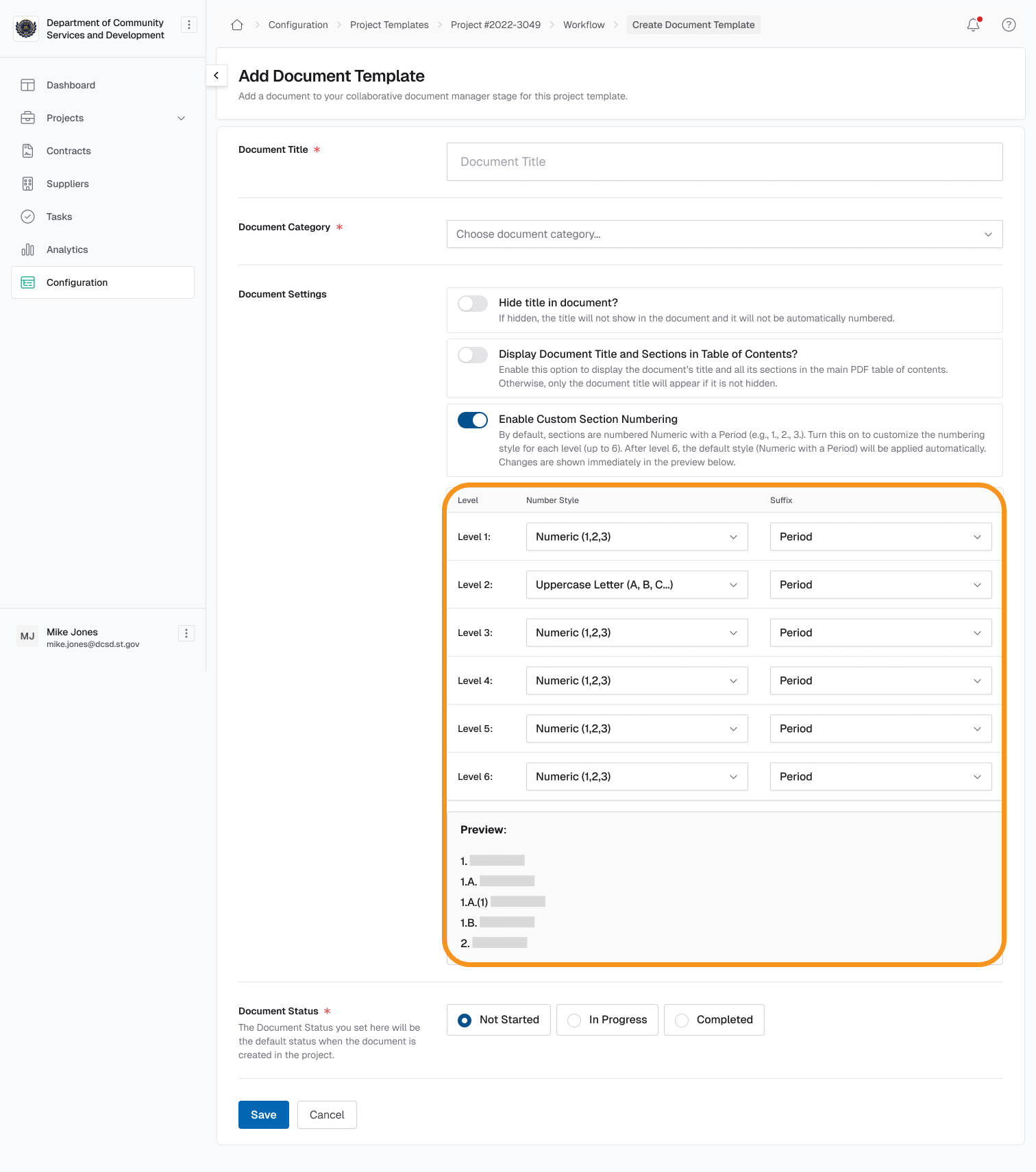
- Choose punctuation options (periods, parentheses, or none) for each level to match documentation standards.
- Automatically update numbering when sections are added, removed, or reordered, keeping documents accurate.
- See numbering consistently applied across Collaborative Document Management (CDM), contract repository, supplier view, and exports to Word and PDF.
- Maintain backward compatibility so documents without custom numbering continue using the default numeric format.
Edit Deliverables and Evaluation Workbooks During Online Submissions
Summary:
Agencies can now update deliverables and evaluation workbooks while Online Submissions is open, without unpublishing the stage. All edits happen in a draft version of the stage, so suppliers continue working on the latest completed version without disruption. Once the addenda is published, suppliers are notified of changes and directed to the specific updates they need to review, ensuring clarity and reducing rework.
New Functionalities Added:
- Edit deliverables in draft addenda versions so updates can be made without halting the submission process.
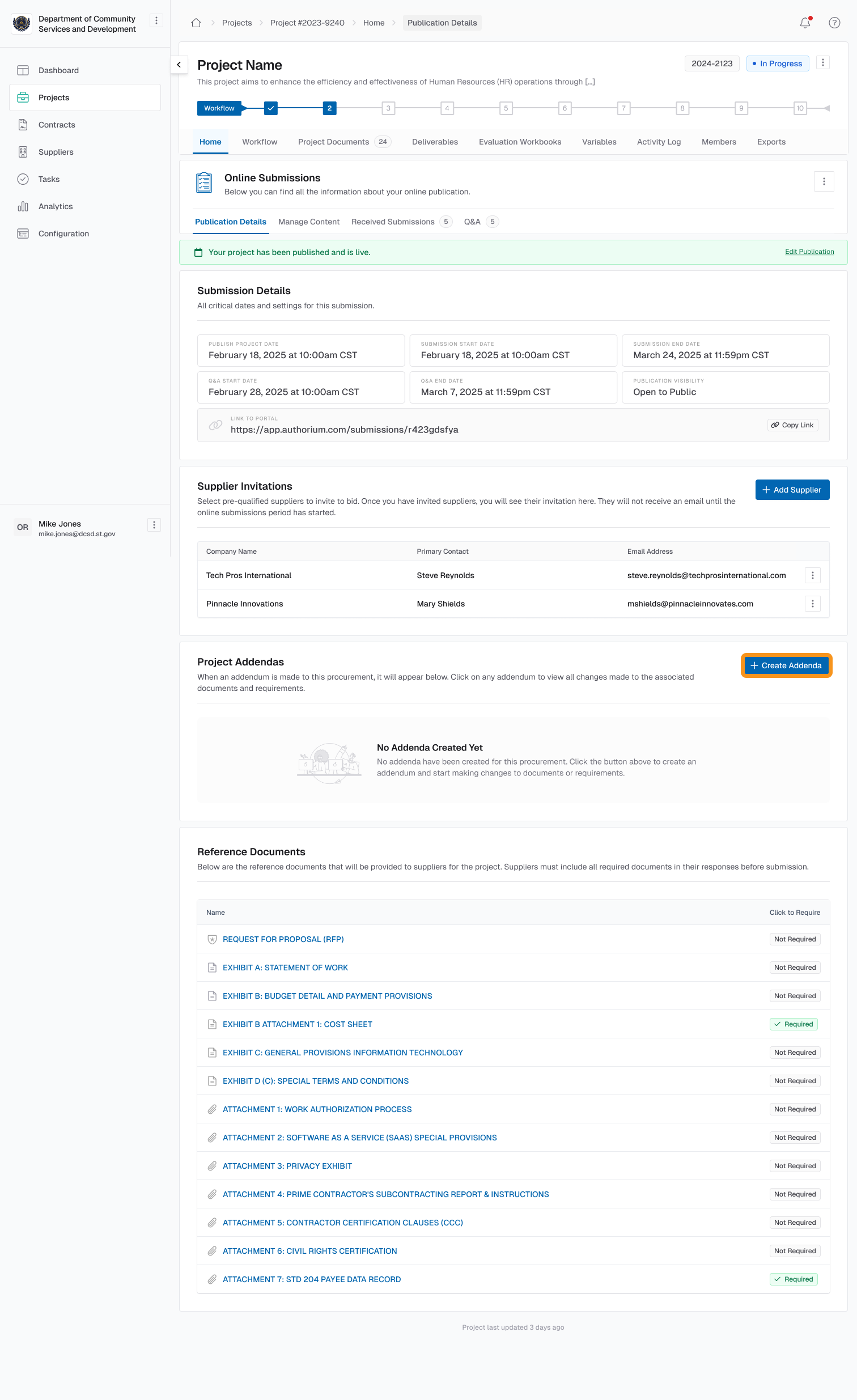
- Update evaluation workbooks in draft versions to refine criteria while suppliers keep working uninterrupted.
- Ensure suppliers only see completed versions until addenda are officially published, avoiding confusion.
- Notify suppliers automatically when changes are published, with direct links to the updated items.
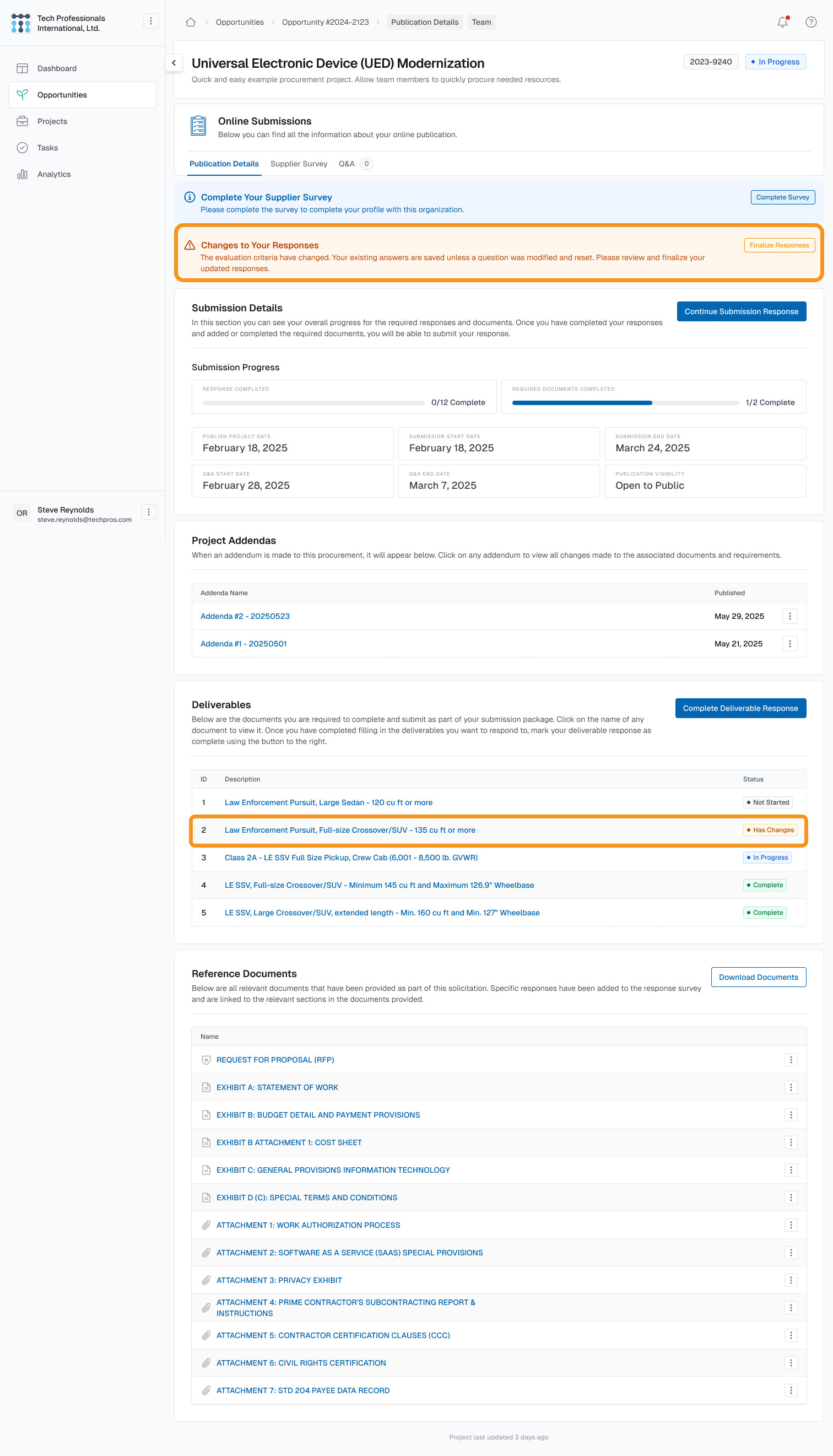
- Preserve supplier responses so only modified items need to be updated, reducing unnecessary rework.
- Guide agencies and suppliers with improved UX that highlights where edits are required and what has changed.
Coming Soon
Tasks
- Create tasks from comments: turn feedback into trackable action items
- Task filtering and search: refine task lists by status, due date, or assignee
- Task prioritization: mark tasks as high, medium, or low priority
- Custom status categories: tailor status labels to match your workflows
- Kanban view: visualize tasks in a drag-and-drop board format
- In-app notifications: stay updated without relying only on email
- Reports and analytics: generate summaries of task progress and completion
- Archive tasks: move completed or outdated tasks into a dedicated archive
Addenda
- Add documents to addenda packages: expand the scope of updates by attaching supporting files.
- Download combined PDFs: generate a single document that consolidates all addenda materials.
- Add a summary of changes: give suppliers a quick overview of updates without reviewing the entire addenda.
- Show full solicitation package in addenda view: let suppliers and agencies see the complete context alongside the addenda.
- Further UX improvements: refine the addenda creation and completion experience based on feedback.
Track Changes
- Guest contributor support: allow contributors to edit documents but not accept or reject tracked changes.
- Granular role-based permissions: define who can only edit versus who can accept/reject changes.
- Reporting and analytics: gain insights into tracked edits across collaborative documents.
Custom Section Numbering
- Enhanced configuration preview: see a visual hierarchy with nested numbering styles to confirm formatting before applying settings.
- Project-side configuration: allow numbering schemes to be set or adjusted during active projects, including when adding new Collaborative Document Management (CDM) sections or selecting connected projects.